Strapi custom query for data filtering

Strapi as a backend REST API generator
Strapi is a flexible, open-source Headless CMS (Content Management System). It enables developers to quickly build data models (a.k.a. content types or entities) using an admin panel displayed in a web page. Once you create the entities, Strapi generates a basic REST API for you to interact with. With this API, you can fetch data using pre-defined filters. For more specific filters however, you will need to implement a Strapi custom query.
Let’s say you create an article entity with a title, date and body. Then Strapi will create automatically the following endpoints:
| GET | /article | get a list of article entries |
| GET | /article/:id | get a specific article |
| GET | /article/count | count the number of article entries |
| POST | /article | create a new article entry |
| DELETE | /article/:id | delete a specific article |
| PUT | /article/:id | update a specific article |
As you see, Strapi implements the basic CRUD methods out of the box. There are also multiple operators you can use to filter, sort and limit the data returned by the GET endpoints. This is a huge time-saver, especially when you need to craft a rapid prototype.
AND filtering in Strapi
There are, however, limitations to the available filters. For instance, while the OR operator is automatically supported, the AND operator is not. Let’s say you use the same operator within the query parameters, this will result in an OR operator by default:
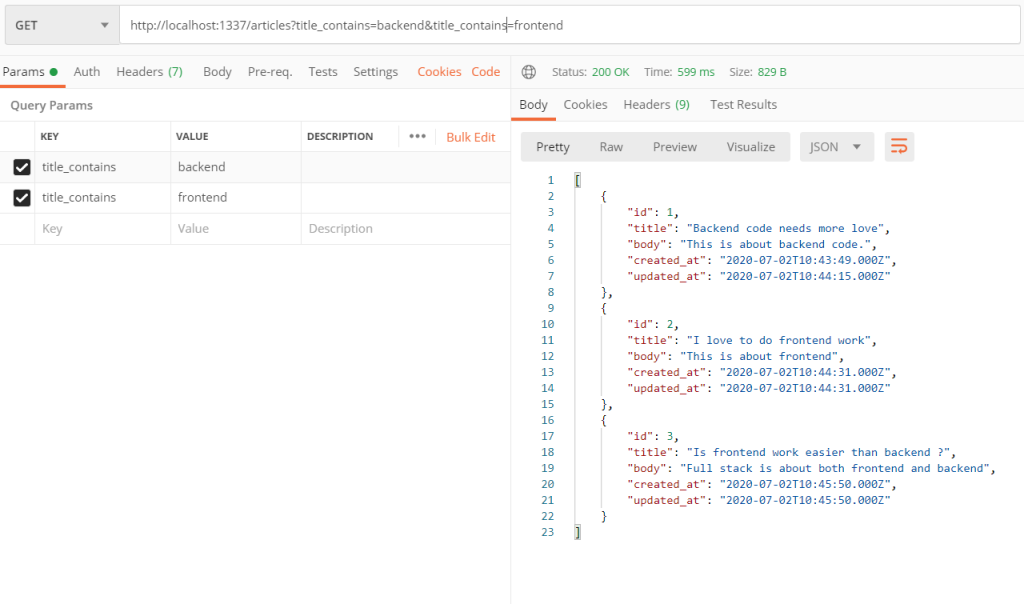
GET /articles?title_contains=frontend&title_contains=backend
The above query will return all articles that contain either ‘frontend’ OR ‘backend’ in the title. But what if you wanted to filter out only the articles that have both words in their title ? The answer from the documentation is you will have to create a Strapi custom query. Now I will show you how to do that for Strapi version 3.0.
Customizing Strapi API in the service layer
The API Strapi automatically creates is available for customization in the /api folder of your project. It has two layers : the controllers layer, that receives the incoming request and returns the response, and the service layer, where the business logic happens. A good practice is to keep the controller as light as possible : the controller handles the request parameters and calls the right service method. The custom logic happens in the service layer, so that is where we will implement our solution.
Here’s an overview of what we will do : we will override the find() method in the service layer to write a custom query, using the ORM (object relational mapper).
The ORM is the perfect tool to design custom queries, because it is an abstraction over the database. The ORM enables you to express your queries in Javascript and they eventually get translated into the specific query language of underlying database. Using the ORM instead of filtering the results yourself is important for 1) separation of concerns and 2) performance. The database engine is best at filtering its data, so why not delegate that kind work to it? Otherwise, if you have a very large result set and you filter it yourself, you could block the thread (since Strapi is built on Node.js, blocking code is to be avoided). Even if you have a small result set, using the ORM is beneficial because it’s more readable and reusable.
Implement the Strapi custom query
Once you have created a strapi project and created some custom Content Type in the admin panel (don’t forget to set permissions to the public role to access the find request for your content type), you will navigate to the /api/{contentType}/services/{contentType}.js file. In our example, that would be the /api/article/services/article.js file. There, you will define a method to override the default find() method.
The code below is the solution for an SQL database with Strapi 3.0:
module.exports = {
    find(params, populate) {
        // Simple AND query
        let andFilter = Object.keys(params).find(val => val.search('_containsAnd') >= 0);
        if(andFilter){
          // AND filtering
          const property = andFilter.split('_')[0];
          const values = params[andFilter];
          const model = strapi.query('article').model;
          return model.query(qb => {
            qb.where(property, 'LIKE', `%${values[0]}%`)
            for(let i=1; i<values.length; i++){
              qb.andWhere(property, 'LIKE', `%${values[i]}%`)
            }
          }).fetchAll()
        } else {
          // Normal behavior
          return strapi.query('article').find(params, populate);
        }
    },
};
The find() method receives the request parameters in the params argument. We invent a custom filter called _containsAnd to differentiate the AND from the default OR operator. So our request should look like:
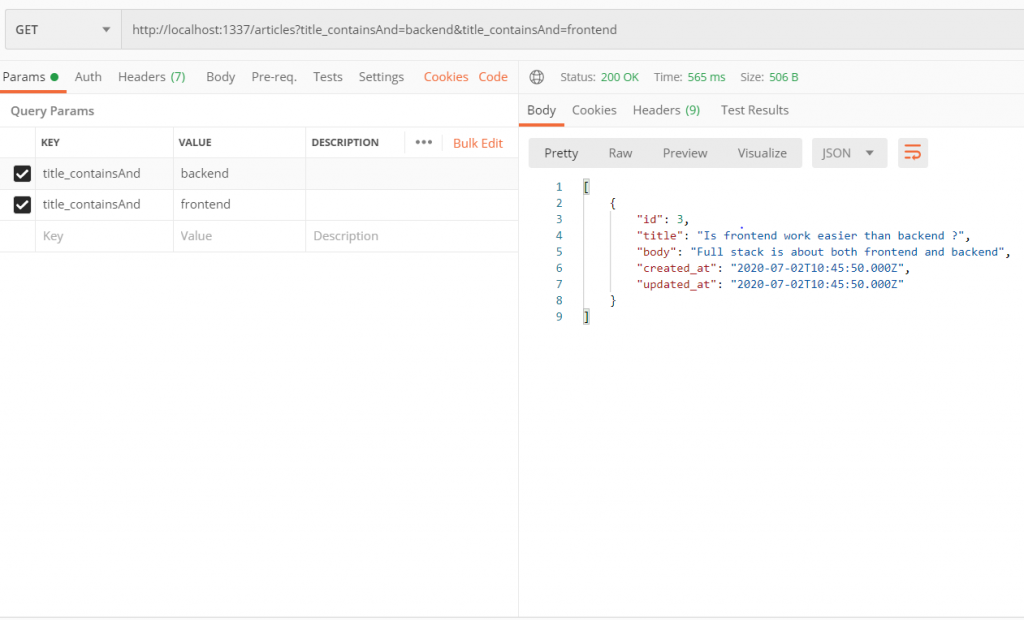
GET /articles?title_containsAnd=frontend&title_containsAnd=backend
Note that our solution works for any field of the article object. If the _containsAnd filter exists in our request, we process it by first getting access to the ORM model:
const model = strapi.query(‘article’).model;
Strapi supports two ORMs : Bookshelf and Mongoose. Bookshelf is used for an SQL database such as PostgreSQL, MySQL, or SQLite3. This ORM uses the Knex SQL query builder under the hood and it is made available within the Bookshelf query() method we will use. Mongoose is of course used with the no-SQL database MongoDB.
We use the ORM to build a query using the LIKE SQL operator and the % wildcard (this searches for a given substring within the field). We loop over all the filter values and apply the andWhere() predicate from the Knex module. In the end we fetchAll() the results and return them to the controller.
Results for our example
For our example, here are the results for the request with (default) OR operator, using Postman (all the articles that contain either the term “frontend” or “backend” are returned):
And then for the request with AND operator (only the article with both “frontend” and “backend” terms is returned):
In this short example, we have implemented a Strapi custom query for AND filtering of data using Bookshelf and Knex. Here we have applied the filtering for one field only. The same process could be used for some more complex filtering : instead of overriding the find() method in the service, one could create a new endpoint in the controller and call a new service method that expects certain filtering parameters and behaves accordingly. The ORM model and query builder are versatile and well suited for this job. Note that a similar example could be developed using MongoDB since Strapi provides access to the underlying Mongoose ORM.